The Gaiatop USB Desk Fan review is most relevant to shoppers who want a small tabletop fan with straightforward controls and USB power.
Its three speed settings and tilting head make it a flexible personal cooling option for a desk, bedroom, or travel setup.
Gaiatop Desk Fan Review Summary
The quick verdict
28,000+ ratings
Read Amazon ReviewsGaiatop USB Desk Fan
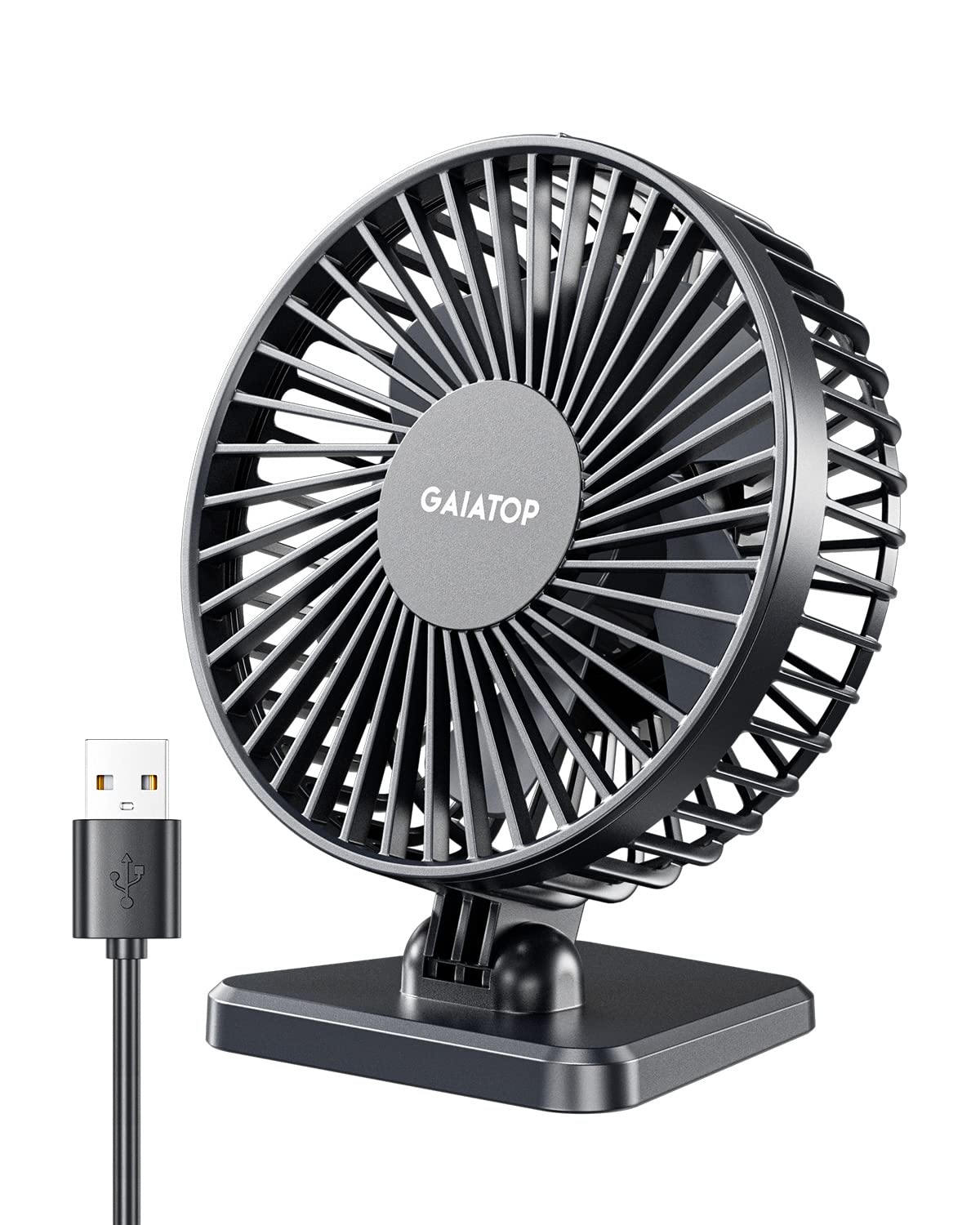
A lightweight USB fan for people who want simple, adjustable airflow at a desk, bedside table, or other spot with USB power.
- USB powered, with a five-watt rating and 5-volt specification.
- Three speed settings: low, medium, and high, selected by pressing the power button repeatedly.
- Fan head tilts vertically through 30 degrees for directional adjustment.
- Five-blade design in a compact tabletop format.

Pros
- Lightweight and compact for moving between nearby work or rest spaces.
- Three speed levels allow a choice between gentler and stronger airflow.
Consider before buying
- It is not cordless, so placement depends on access to a USB power source and a manageable cable route.
- The described vertical tilt is limited to 30 degrees, which may not suit every preferred airflow angle.
Read the full review summary
This compact fan is designed for personal airflow where a full-size room fan would take up more space.
It weighs less than eight ounces, uses a five-watt USB connection, and has a tabletop form that can work with a compatible laptop, power bank, USB adapter, or car charger.
The range of power options makes it easier to place where convenient, though it still needs to remain plugged in.
Three speeds and a head that tilts vertically through 30 degrees give you some control over airflow direction and strength. That combination suits desk work, bedside use, and other close-range situations.
Consider it for individual comfort rather than cooling an entire room, and check that your intended USB power source and cable placement work for your setup.
The buying factors
Gaiatop Desk Fan Scorecard
Editorial scores reflect listed features and buyer fit; they are not laboratory measurements or customer ratings.
Personal cooling
Three speed settings offer useful adjustment for a compact fan intended for close-range cooling.
Portability
At less than eight ounces, it is easy to move between a desk, bedside table, or travel space.
Placement flexibility
USB power supports several common power sources, while the tabletop design needs a stable surface and a nearby connection.
Airflow adjustment
The head tilts vertically through 30 degrees, helping direct airflow, though the described adjustment is limited to that axis.
Controls
A push button cycles through three speeds, keeping operation simple.
Room coverage
Its small personal-fan format is better suited to nearby airflow than broad room circulation.
Key Features and Specifications of Gaiatop Desk Fan
- USB powered, with a five-watt rating and 5-volt specification.
- Three speed settings: low, medium, and high, selected by pressing the power button repeatedly.
- Fan head tilts vertically through 30 degrees for directional adjustment.
- Five-blade design in a compact tabletop format.
- Weighs less than eight ounces, according to the product description.
- Compatible USB power sources include computers, laptops, power banks, AC adapters, and car chargers.
Pros and Cons of Gaiatop Desk Fan
Pros
- Lightweight and compact for moving between nearby work or rest spaces.
- Three speed levels allow a choice between gentler and stronger airflow.
- Tilting head helps aim the breeze without repositioning the whole fan.
- USB power allows use with a range of compatible power sources.
Consider before buying
- It is not cordless, so placement depends on access to a USB power source and a manageable cable route.
- The described vertical tilt is limited to 30 degrees, which may not suit every preferred airflow angle.
- Its compact personal format may be a poor match if you need airflow across a large room.
Who Should Buy Gaiatop Desk Fan?
Good fit
Consider this fan if you want a lightweight, easy-to-place source of personal airflow for a desk, bedside table, or similar surface.
The three speeds and tilting head provide basic but useful adjustment for directing a breeze toward your sitting or resting position.
It can also suit people who want to power a small fan from equipment they already use, such as a computer or compatible USB adapter.
Before choosing, check the placement of your power source and cable, especially if you plan to use it in a car or while traveling.
Who should skip it
Skip it if you need a cordless fan, broad room circulation, or extensive control over the direction of airflow. Its design centers on plugged-in tabletop use and a limited vertical tilt.
How the Gaiatop Desk Fan fits everyday use
Personal airflow for a small space
A compact tabletop fan is easiest to assess by how close it will sit to the person using it.
This model’s three speeds let you adjust the breeze for nearby use, but its small format is a reason to keep expectations focused on personal comfort rather than cooling a whole room.
USB power and placement
USB compatibility gives you options for powering the fan from a computer, laptop, power bank, adapter, or car charger that supports USB.
Because the fan is not cordless, think through where the power connection will sit and whether the cable can reach without making the chosen surface awkward to use.
Aiming the fan
The head tilts vertically through 30 degrees, allowing some adjustment while the base stays on the table.
This is useful when the fan and user are not at exactly the same height; if you need to aim airflow in other directions, check whether its fixed tabletop position suits your intended arrangement.
Simple speed control
The push button cycles through low, medium, and high settings, so speed adjustment is direct. This offers a straightforward way to change airflow as your needs shift, though it does not provide more granular speed selection.
Alternatives to Gaiatop Desk Fan
No alternative model is recommended here. Compare the design and features that matter to your routine before choosing another option.
Is Gaiatop Desk Fan Worth It?
The Gaiatop USB Desk Fan is worth considering if you want a lightweight tabletop fan with three speeds, a tilting head, and flexible USB power options.
Its compact size makes it practical for personal use in a small space.
Choose it when a plugged-in fan with basic directional adjustment matches your setup. Look elsewhere if you need cordless operation, broader room coverage, or more extensive aiming options.
Your review at a glance
28,000+ ratings
Read Amazon ReviewsGaiatop USB Desk Fan
A lightweight USB fan for people who want simple, adjustable airflow at a desk, bedside table, or other spot with USB power.
- USB powered, with a five-watt rating and 5-volt specification.
- Three speed settings: low, medium, and high, selected by pressing the power button repeatedly.
- Fan head tilts vertically through 30 degrees for directional adjustment.
- Five-blade design in a compact tabletop format.